API: Contacts, Chats, Instances & Sesi
Last updated: September 19, 2026
API: Contacts, Chats, Instances & Sesi
Gunakan endpoint GET untuk membaca data. Setiap permintaan memerlukan X-API-Key dan permission yang sesuai.
1. Senarai contact
GET /api/v1/contacts
| Parameter | Tujuan |
|---|---|
| page | Halaman rekod; dokumentasi asas menggunakan permulaan 1 |
| limit | Bilangan rekod setiap halaman; nilai lalai yang didokumenkan ialah 50 |
| search | Cari nama atau nombor |
Contoh: GET /api/v1/contacts?page=1&limit=50&search=Ahmad
Respons senarai mengandungi contacts, total, page dan limit. Rekod boleh mempunyai id, name, phone, email, tags dan createdAt. Semak nilai null/kosong dalam sistem anda.
2. Senarai chat
GET /api/v1/chats
Gunakan page dan limit untuk pagination serta instanceId untuk menapis sambungan. Contoh: GET /api/v1/chats?page=1&limit=50&instanceId=1.
Respons asas mengandungi chats dan metadata halaman. Maklumat ringkasan seperti lastMessage atau unreadCount bukan keseluruhan sejarah perbualan.
3. Senarai instance
GET /api/v1/instances
Gunakan hasilnya untuk mengenal pasti ID sambungan serta status. Jangan meneka instanceId daripada kedudukan senarai atau nombor telefon.
4. Semak sesi WABA
GET /api/v1/session-window?phone=60123456789&instanceId=1
Gantikan nombor dan ID contoh dengan nilai sebenar. Gunakan hasil sesi untuk menentukan sama ada mesej biasa dibenarkan atau templat diperlukan. Jika status tidak jelas, semak ralat dan jangan menganggap sesi terbuka.
Aliran integrasi yang disyorkan
- Semak key dan senarai instance.
- Pilih ID sasaran.
- Ambil halaman pertama contact/chat.
- Teruskan halaman berikutnya berdasarkan metadata sehingga data yang diperlukan diperoleh.
- Kendalikan senarai kosong tanpa menganggapnya ralat.
- Sebelum tindakan penghantaran, semak penerima dan sesi sekali lagi.
Penyelesaian masalah
- Rekod tidak dijumpai: semak carian, instance, organisasi yang terkait dengan key serta permission.
- Hanya sebahagian data: lengkapkan pagination; halaman pertama bukan semua rekod.
- Rekod berulang semasa sync: simpan ID rekod dan elakkan bergantung pada nama sebagai kunci unik.
- Sesi berubah: status sesi ialah keadaan pada masa semakan, bukan jaminan kekal untuk penghantaran kemudian.
Contoh dalam halaman ini ialah rujukan daripada endpoint yang didokumenkan. Ikut respons dan validasi versi API semasa jika medan berbeza.
Endpoint pengurusan dan data
Rujukan setiap butang dan medan
| Butang / medan | Fungsi dan cara penggunaan |
|---|---|
| GET /api/v1/instances | Senaraikan instance pasukan dengan nama, integration, status serta maklumat profil yang dipulangkan. Gunakan nama ini sebagai instanceName pada request lain. |
| GET /api/v1/instances/qr | Parameter instanceName; mendapatkan QR bagi instance Web/Baileys. Respons QR boleh null jika sudah bersambung. QR memberi akses sambungan dan perlu dilindungi. |
| GET /api/v1/groups | Parameter instanceName; search pilihan menapis nama atau JID. Hasil mengandungi kumpulan dan jumlah. |
| GET /api/v1/contacts | Senarai kontak dengan search, limit dan offset. Hasil termasuk tags, funnelStage dan assignedUser apabila tersedia. |
| GET /api/v1/chats | Senarai chat dengan limit, offset dan instanceName pilihan. Hasil boleh mengandungi ringkasan mesej dan unreadCount. |
| GET /api/v1/status | Status WABA, termasuk pengesahan, quality rating, had mesej dan kesahan token mengikut respons. |
| GET /api/v1/session-window | Semak tetingkap perbualan WABA berdasarkan instanceName dan number. |
Cara pagination
Full Spec semasa menyatakan limit lalai 50 dan maksimum 100 bagi Contacts/Chats, dengan offset lalai 0. Baca halaman pertama, semak total, kemudian tingkatkan offset berdasarkan saiz halaman sehingga jumlah yang diperlukan diperoleh. Kekalkan penapis sama supaya halaman boleh dibandingkan. Jangan menganggap satu respons ialah keseluruhan pangkalan data.
Memahami medan dan ralat
Dalam Contacts, assignedUser menerangkan ejen, funnelStage peringkat pipeline dan tags label. Dalam Chats, lastMessageTimestamp, lastMessageFromMe serta unreadCount membantu membaca keadaan perbualan; maklumat mesej bergantung pada akses kunci. 401 menunjukkan isu authentication; 400 boleh menunjukkan parameter atau jenis instance tidak sesuai; 404 menunjukkan rekod/instance tidak ditemui bagi endpoint berkenaan. Rujuk Full Spec kerana respons berbeza mengikut endpoint.
Gunakan hanya medan yang diperlukan aplikasi dan jangan menghantar senarai kontak penuh kepada perkhidmatan lain tanpa skop yang jelas. Contoh dalam dokumentasi ialah struktur rujukan, bukan credential atau ID yang boleh terus digunakan.
Screenshot rujukan menu
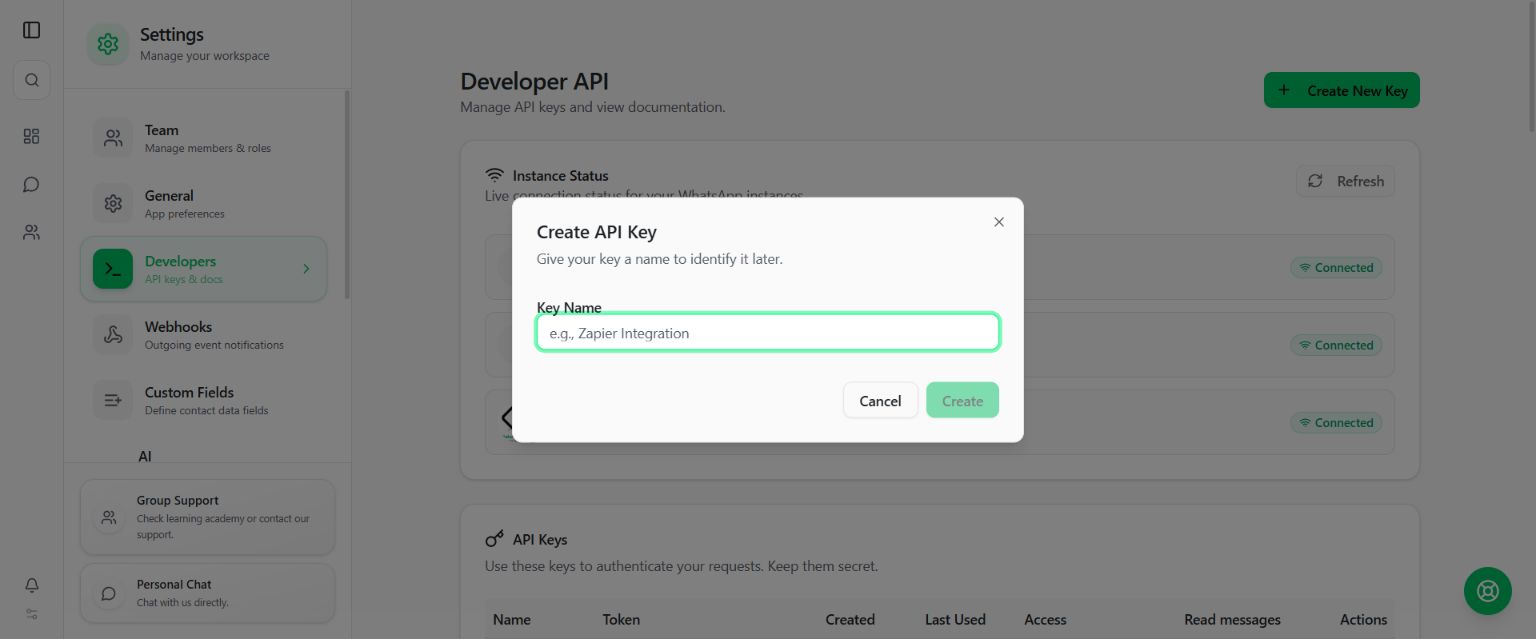
Padankan nama butang pada gambar dengan penerangan di atas. Maklumat sensitif tidak ditunjukkan dalam screenshot panduan.