Webhooks: Terima Peristiwa & Sahkan Hasil
Last updated: September 19, 2026
Webhooks: Terima Peristiwa & Sahkan Hasil
Terima notifikasi peristiwa pada server anda supaya sistem luar boleh bertindak apabila aktiviti berlaku.
Sebelum mula
Sediakan endpoint HTTPS milik organisasi anda dan kaedah menyimpan rahsia pada server. Bezakan webhook masuk ke sistem anda daripada panggilan API untuk menghantar data ke NakWasap.
Cara penggunaan langkah demi langkah
- Buka Settings → Webhooks jika tersedia pada akaun anda.
- Pilih Add Webhook dan masukkan URL endpoint penerima.
- Pilih hanya peristiwa yang diperlukan dan tetapkan Secret mengikut medan konfigurasi.
- Simpan dan pastikan endpoint boleh menerima permintaan dengan badan JSON.
- Sahkan tandatangan melalui kaedah yang ditetapkan oleh versi webhook anda sebelum memproses data. Dokumentasi asas menyebut header X-Webhook-Signature; jangan meneka algoritma jika tidak dinyatakan.
- Uji satu peristiwa terkawal, catat payload dan semak hasil pada sistem penerima.
- Kendalikan peristiwa berulang secara idempotent supaya satu kejadian tidak menghasilkan tindakan berganda.
Contoh penggunaan
Peristiwa contact.created digunakan untuk memaklumkan sistem CRM luar bahawa contact baharu telah diwujudkan. Simpan rujukan rekod supaya webhook sama tidak mencipta contact pendua.
Semak hasil
Semak jenis event, masa, instance dan data. Respons endpoint yang berjaya tidak semestinya bermaksud tindakan perniagaan hiliran selesai.
Penyelesaian masalah
- Tiada event: semak URL, pilihan event, akses rangkaian dan konfigurasi.
- Tandatangan gagal: semak secret, badan permintaan asal dan kaedah pengesahan rasmi.
- Data berganda: tambah kawalan deduplikasi menggunakan rujukan peristiwa/rekod yang tersedia.
- Payload berbeza: ikuti payload sebenar dan spesifikasi versi semasa.
Peristiwa dalam dokumentasi asas
| Event | Maksud |
|---|---|
| message.received | Mesej diterima |
| message.sent | Mesej dihantar |
| contact.created | Contact diwujudkan |
| chat.assigned | Chat ditugaskan kepada ahli |
Payload contoh mempunyai event, timestamp dan data seperti messageId, from, body serta instanceId. Medan data bergantung pada jenis event. Jangan log kandungan pelanggan atau secret secara terbuka.
Setiap medan Settings > Webhooks
Rujukan setiap butang dan medan
| Butang / medan | Fungsi dan cara penggunaan |
|---|---|
| Add Webhook | Buka borang endpoint baharu. |
| Endpoint URL | URL penerima notifikasi acara. Pastikan ia dimiliki atau dibenarkan oleh perniagaan kerana payload boleh mengandungi data pelanggan. |
| Description | Terangkan tujuan, contohnya kemas kini CRM. |
| Message Received | Acara mesej masuk. |
| Message Sent | Acara mesej keluar. |
| Status Update | Perubahan status yang dipancarkan oleh sistem. |
| Contact Created / Contact Updated | Kontak baharu atau perubahan data kontak. |
| Chat Assigned | Perubahan tugasan chat kepada ejen. |
| Instance Status | Perubahan status sambungan peranti. |
| Add Header | Tambah Header name dan Header value untuk HTTP header seperti authentication. Ikon buang mengeluarkan baris header. |
| Save Webhook | Simpan endpoint dan sekurang-kurangnya satu acara; konfigurasi boleh mula menghantar data apabila acara berlaku. |
| Cancel / Close | Tutup tanpa mewujudkan sambungan. |
Urutan persediaan
Sediakan endpoint penerima dan tentukan data yang diperlukan. Pilih acara minimum yang berkaitan, masukkan URL serta header yang betul dan semak perlindungan payload pada pihak penerima. Simpan hanya apabila penghantaran kepada destinasi itu memang diluluskan. Untuk demonstrasi, buka borang kosong dan Cancel seperti screenshot.
Outgoing Webhooks ialah notifikasi daripada akaun ke aplikasi luar. Ia berbeza daripada node Webhook dalam Flow Builder atau alat webhook AI Agent yang dipanggil dalam aliran masing-masing. Jangan menukar ketiga-tiga konfigurasi seolah-olah ia fungsi yang sama. Tiada endpoint disimpan atau test webhook dihantar semasa penyediaan panduan.
Screenshot rujukan menu
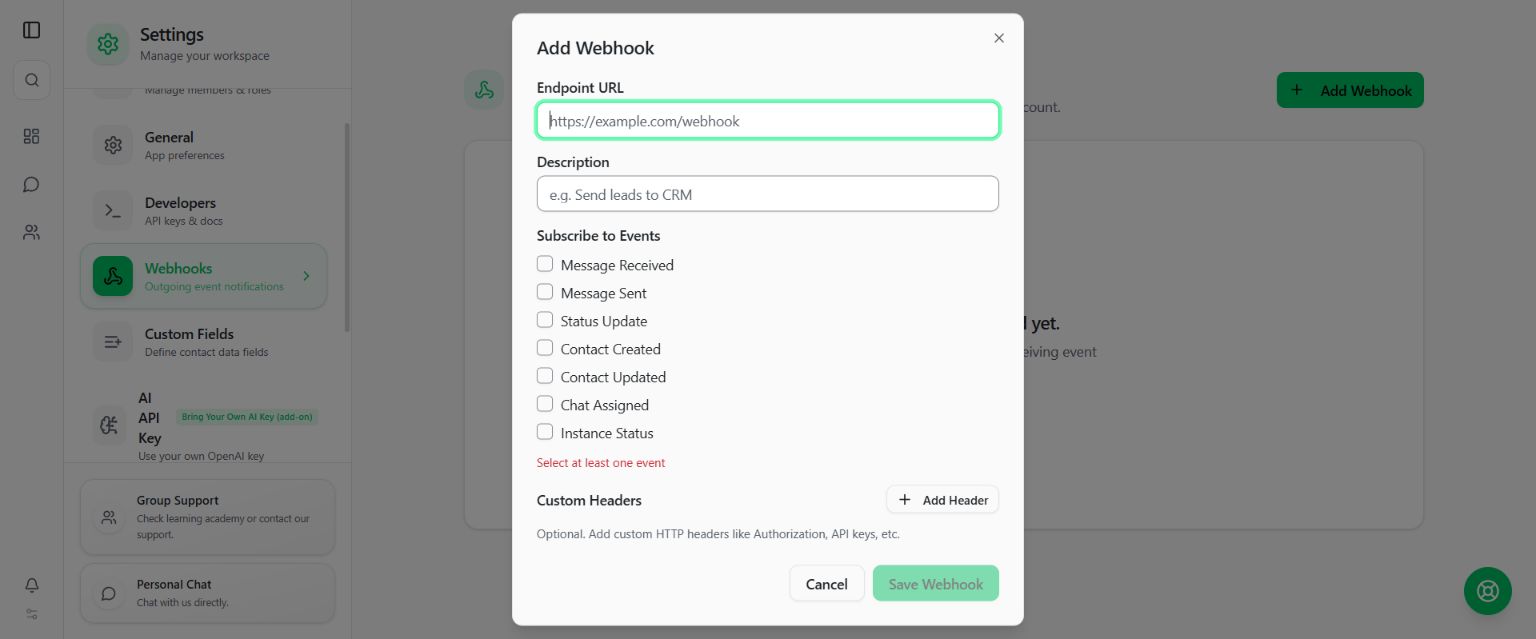
Padankan nama butang pada gambar dengan penerangan di atas. Maklumat sensitif tidak ditunjukkan dalam screenshot panduan.